

Key Takeaways:
- Amazon category optimization matters because your primary browse node determines which Best Seller Rank you compete for and which buyers ever see your listing through category browsing and filters.
- When multiple categories are technically eligible for your product, a competition-based framework not intuition is the reliable way to choose category on Amazon.
- A less crowded but still genuinely relevant subcategory can outperform a broader, high-traffic category, because Amazon category ranking is relative to competitors sharing your specific node.
- Changing categories on a listing that already has sales history risks losing accumulated ranking momentum Amazon can refuse the request outright, and even when approved, history doesn’t transfer cleanly.
- Category-specific attributes and filters only surface your listing to buyers who narrow their search using them, which makes accurate product classification a discoverability factor, not just an administrative field.
Why Category Isn’t Just a Filing Decision (the BSR and Discoverability Connection)
Most sellers treat category assignment as a formality pick whatever sounds closest, move on to the listing copy that actually feels like SEO. That instinct undersells how much weight the category field carries on its own.
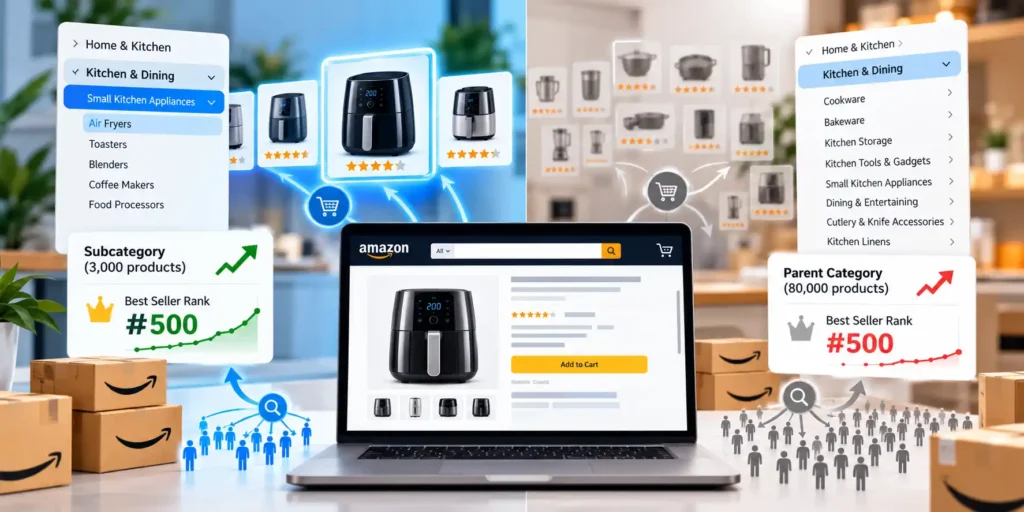
Your primary browse node is the single biggest amazon category ranking factor most sellers never audit. It determines which Best Seller Rank you compete for a #500 rank in a 2,000-product category signals something completely different than a #500 rank in a 200,000-product category, even on identical sales volume.
Category also gates a chunk of Amazon product discoverability that has nothing to do with search terms at all. Buyers who browse a category page, filter by attribute, or shop through “customers also viewed” recommendations are all being routed by category and attribute data a buyer using those paths will never see your listing if it’s filed somewhere they wouldn’t think to browse.
These are search visibility factors that operate independently of your keyword optimization. A perfectly key worded title in the wrong category is still competing against the wrong Best Seller Rank pool and missing the buyers who navigate by browsing instead of searching.
A worked example: two listings with identical titles, bullets, and backend Search Terms one filed under a 3,000-product subcategory, one under its 80,000-product parent category will show meaningfully different Best Seller Rank numbers at the same sales volume, because the rank itself is calculated relative to a completely different competitor pool in each case.
Choosing Between Multiple Eligible Categories: A Competition-Based Framework
Most products genuinely qualify for more than one category. The question isn’t which one is technically allowed its which one gives you the best combination of relevant traffic and winnable competition.
Start by identifying 3-5 real competitor’s products a buyer would actually compare yours against and checking which category and subcategory they’re filed under. When competitors cluster in one specific node, that clustering itself is strong evidence of the right category relevance signals for your product type, more reliable than guessing from the category tree alone.
Resist the instinct to choose category on Amazon based on the lowest referral fee. A lower-fee category that doesn’t match your actual competitors and buyer intent trades a small fee savings for ranking against the wrong peer set and surfacing to the wrong browse traffic entirely.
Browse node selection should also account for what happens after you’re indexed, not just whether you’re eligible. A technically-correct but overly broad category buries a new listing under thousands of established competitors with years of review history eligible isn’t the same as competitive.
Amazon category SEO, done properly, treats this as ongoing work rather than a launch-day checkbox. Competitor clustering in a given node can shift over a year as new sellers enter or established ones exit, which means the category that fit best at launch isn’t guaranteed to still be the strongest option a year later.
Less Crowded but Still Relevant: When a Narrower Subcategory Wins
A broad category isn’t automatically the better choice, even though it looks like more total traffic on paper. Product category mapping into a narrower, more specific subcategory can outperform a broad node when the competition math favors it.
The logic is straightforward: Best Seller Rank is relative to everyone else in your specific node, not an absolute measure of demand. A product ranking #50 in a subcategory of 1,500 listings is a stronger, more visible position Best Seller badge included than the same sales volume producing rank #4,000 in a broad category of 100,000 listings.
Evaluate a narrower subcategory by checking total listing count, how many reviews the current top 10 products carry, and whether search volume for the terms tied to that node still reflects genuine buyer demand. A subcategory that’s narrow because almost nobody searches it isn’t a win it’s just a quieter dead end with a better-looking rank number.
A sensible category placement strategy treats broad and narrow categories as a genuine tradeoff to evaluate per product, not a default choice made once and never revisited as competition in either node shifts.
A worked example: a reusable coffee filter moved from a crowded, roughly 48,000-listing general category into a roughly 1,200-listing specialized subcategory reached a top-3 rank within two weeks, using the identical product and identical ad budget it had been running with in the broader category. Nothing about the product changed only the competitor pool it was being measured against.
What Changing Categories on an Established Listing Actually Risks
Choosing well at launch matters more than most sellers realize, because changing categories later isn’t a simple settings update once a listing has real history behind it.
Requesting a primary browse node change on an established listing typically requires a Seller Support case, and Amazon frequently declines the request outright there’s no guaranteed mechanism to move a listing once it’s live and selling. Even when a change is approved, the accumulated sales velocity, review count, and ranking signals that built your standing in the old category don’t cleanly transfer into the new one.
This means a listing that’s underperforming due to a genuine category mismatch faces a real tradeoff: staying put in the wrong node keeps compounding ranking history in a category that was never the right fit, while requesting a change risks a rejected ticket and, if approved, a reset that starts your new-category ranking history closer to zero than sellers expect.
There’s no reliable published data on Amazon’s approval rate for these requests, and Growth Naavik hasn’t run enough of them internally to cite a firm number here either. Treat any category-change request as a genuine gamble rather than a guaranteed fix, and weigh it against the alternative of simply optimizing harder within the category you’re already in.
For your business, this is the strongest argument for getting category selection right before launch rather than treating it as easily fixable later the cost of a wrong initial choice is meaningfully higher than the cost of the extra research to avoid it. A day spent on competitor clustering and win ability research before your first unit ships is cheaper than a Seller Support ticket filed a year and hundreds of reviews later.
Category-Specific Attributes and Filters Buyers Use to Narrow Their Search
Every category on Amazon comes with its own set of filterable attributes material, color, size, certification, use case and which attributes exist at all depends entirely on which category and subcategory your listing sits in.
A buyer filtering a search by “dishwasher safe” or “BPA-free” will only see listings where that attribute is filled in correctly for the category they’re browsing in. If your product sits in a category that doesn’t expose the attribute filter your buyers actually use to narrow their search, you’re invisible to that specific filtering behavior no matter how complete your title and bullets are.
This is where amazon product category optimization and keyword optimization genuinely intersect: category keyword relevance isn’t just about the words in your listing, it’s about whether the category itself even offers the filter structure your ideal buyer relies on to narrow a crowded search down to a shortlist.
Amazon browse node optimization done well means checking, category by category, which filters top competitors in your space have populated and confirming your own listing’s attributes are complete enough to appear when a buyer uses them.
A worked example: a buyer shopping for a travel mug filters by “leak proof” and “dishwasher safe.” A listing sitting in a category where those two attributes exist as filters, with both fields correctly filled in, appears in that narrowed result. An identical product in a category without that filter structure or with the fields left blank simply doesn’t show up for that specific buyer, regardless of how the title reads.
Auditing Your Own Category Fit This Week
Check your current category against 3-5 real competitors first if they cluster somewhere you’re not, that’s the clearest signal something’s worth investigating. Then compare your Best Seller Rank position in your current node against what a narrower, less crowded subcategory would likely produce at the same sales volume, using total listing count and top-10 review depth as your rough guide.
Once your category is confirmed as the right fit, the next place most listings leave visibility on the table is keyword coverage inside that category. Amazon Search Term Optimization: How to Find and Fix Keyword Gaps covers a free method for finding exactly which relevant terms your listing is still missing.