

Key Takeaways:
- ACoS moves on two inputs, spend and conversion most sellers only ever adjust the first one, which is why bidding your way out of a rising ACoS so often makes it worse.
- The Placement Report Splits Sponsored Products performance by Top of Search, Rest of Search, and Product Pages three numbers hiding inside every “one” conversion rate you’ve been looking at.
- A keyword converting below your account average isn’t automatically underperforming a discovery-stage search and a purchase-intent search should never be judged against the same baseline.
- Cookbeat’s 25% sales growth and 70% return-rate drop in 90 days came from fixing what shoppers actually saw on the listing, not from spending more to reach them.
- When conversion is weak across every placement and every keyword-intent tier at once, the ads aren’t the problem the product detail page is.
The ACoS Math That Makes Conversion Rate the Better Lever
ACoS is spend divided by ad sales. There are only two ways to move that number: change what you spend, or change how many of your clicks turn into sales. Most sellers only ever touch the first one raising or lowering bids while the second one, amazon ppc conversion optimization, sits untouched even though it’s the half of the equation that doesn’t cost anything extra to improve.
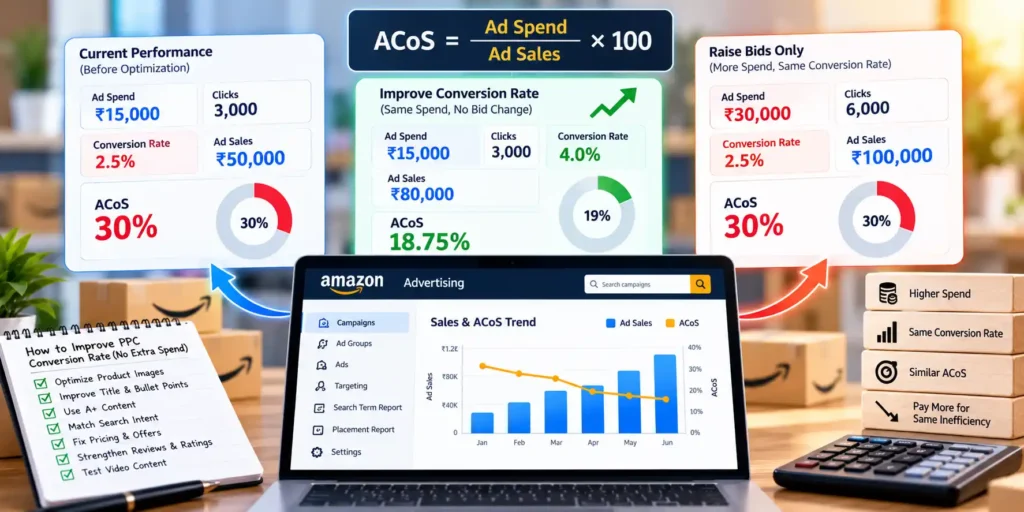
Here’s the math that makes this concrete. A campaign spending ₹15,000 a month at a 30% ACoS is generating ₹50,000 in ad sales. If that spend comes from 3,000 clicks converting at 2.5%, lifting the conversion rate to 4% with the exact same clicks and the exact same spend pushes ad sales to roughly ₹80,000, dropping effective ACoS to under 19% without a single bid change.
Compare that to the alternative: raising bids to buy more of those same 2.5%-converting clicks. Spend goes up, ad sales go up roughly in proportion, and the ad-to-sale ratio barely moves you’ve paid more to arrive at the same inefficiency, not fixed it.
For your business, this means the question worth asking before any bid change is whether the clicks you’re already buying are converting as well as they should because that’s the lever that improves the ratio itself, not just the volume running through it.
A second comparison makes the gap concrete over time: run the bid-increase path for six months and you’re paying a growing amount for a flat 2.5% rate, watching ACoS drift upward every time a competitor also raises bids on the same keyword. Run the conversion-side path instead, and every fix that lifts the rate compounds the same budget produces more sales next month than it did this month, with no bidding war required to get there.
Sellers who want to improve Amazon PPC conversions specifically, rather than just watching the ACoS number, are really asking a narrower question than “how do I lower my ad costs” they’re asking “why isn’t a larger share of my paid traffic buying,” which is a conversion question, not a bidding one, and it has a different diagnostic path entirely.
What the Placement Report Actually Tells You About Ad-Driven Conversion
Every Sponsored Products campaign report gives you one blended conversion number by default. The Placement Report, tucked inside Campaign Manager, breaks that same number apart by exactly where the ad ran: Top of Search, Rest of Search, and Product Pages.
Those three placements put a shopper in a different frame of mind. Top of Search shows your ad to someone still inside their own search results, often close to deciding. Product Pages shows your ad on a competitor’s listing, to someone actively comparing a different moment entirely, and one that doesn’t convert the same way.
A worked example: a pet toy seller’s campaign shows a 4% blended conversion rate. Splitting it by placement in the Placement Report shows Top of Search at 8%, Rest of Search at 5%, and Product Pages at 1.5%. The blended number made the campaign look mediocre everywhere; the split shows it’s actually strong in two placements and being dragged down by one.
Conversion-focused targeting means acting on that split instead of the average reducing the Product Pages bid multiplier reallocates the same budget toward Top of Search and Rest of Search, where it’s already converting well, without adding a single rupee to the campaign’s total spend.
Placement multipliers are percentage adjustments layered on top of your base bid, not separate line items in your budget. Setting the Product Pages multiplier to -40%, for instance, tells Amazon to spend less of the existing budget chasing that specific placement, which naturally shifts more of the same impressions toward the two placements already proving they convert.
This isn’t a set-once fix. Placement performance shifts as your review count grows, as competitors adjust their own placement bids, and as your price moves relative to the category. A placement that was your weakest link last quarter can become your strongest one after a listing update check the Placement Report monthly, the same way you’d check ACoS.
Product Pages placement deserves a specific caution before you cut it entirely: it’s also where you show up on your own related products and, if you’re targeting them, on competitor listings cutting it too aggressively doesn’t just remove weak conversion, it removes a placement that can matter for defending your own catalog or reaching shoppers already deep in comparison mode. Reduce the multiplier before eliminating it outright, and re-check after a few weeks of data rather than judging it off a single week.
Why the Same Listing Converts Differently Depending on Keyword Intent
Two shoppers can click through to the identical listing and be in completely different stages of deciding. One typed “phone case” still comparing options, price-checking, maybe three tabs open. The other typed “iPhone 15 Pro Max clear case with MagSafe” they know exactly what they want and are one click from buying it.
Judging both searches against the same conversion benchmark misreads what’s actually happening. Purchase intent keywords should convert meaningfully higher than discovery keywords on the same listing, because the shopper arrived already decided, not because the ad or the listing did anything different for each of them.
A worked example: “phone case” converts at 2.5% and “iPhone 15 Pro Max clear case with MagSafe” converts at 3%. On paper, the second term looks like the better performer. But a purchase-intent search that specific should be converting closer to 6-7% at 3%, it’s actually the weaker result of the two, once your account for how much closer to buying that shopper already was.
Increase PPC sales Amazon campaigns generate by running this kind of sales attribution analysis on your Search Term Report sorting by intent tier, not just by raw conversion rate before deciding which terms need a fix and which are already performing exactly as their intent tier should.
This matters most when you’re deciding where to spend a limited testing budget. A generic discovery term with room to grow its conversion rate through better images or pricing is a slower, broader fix that touches every visitor to the listing. A specific purchase-intent term underperforming its tier is usually a narrower, faster fix often something as simple as the ad creative not matching what that precise search implied, rather than anything wrong with the product itself.
For your business, this means building intent tiering into how you read the Search Term Report permanently, not just as a one-time exercise a term’s raw conversion rate only becomes meaningful once you know which tier it belongs to.
Ruling Out the Listing Before You Blame the Ads
Placement and keyword-intent checks both assume the problem is specific one placement, one tier, one segment of traffic. Sometimes the real answer is broader than that, and no amount of bid or targeting adjustment inside the campaign will fix it.
If amazon ads conversion rate is weak across every placement and every intent tier at once, pull your organic conversion rate for the same ASIN from Business Reports. A healthy organic number alongside a weak ad number points to something specific about the paid experience creative-to-keyword mismatch, most often. A weak organic number too means the product detail page itself is the shared cause, and product page conversion won’t improve until that gets fixed directly.
Cookbeat’s experience is a useful illustration of what a real listing-side problem looks like, even though the case study itself isn’t PPC-specific. Misleading product descriptions had created a gap between what buyers expected and what they received, driving returns up and suppressing sales regardless of how traffic arrived at the listing. Once Growth Naavik fixed the listing content and the account issues behind it, Cookbeat’s return rate dropped 70% and sales grew 25%, both within 90 days a result that came from fixing what shoppers saw, not from spending more to get them there.
For your business, this means amazon ppc sales optimization has a ceiling: it finds and fixes which ad traffic underperforms relative to other ad traffic, but it can’t repair listing conversion factors that are dragging down every visitor regardless of how they arrived.
Before assuming the listing, itself is at fault, rule out one narrower possibility: a mismatch between what the ad promised and what the listing shows. A Sponsored Brands ad running a lifestyle image that doesn’t match the plain product-on-white main image on the listing page creates a moment of confusion right at the point of landing a shopper who clicked expecting one thing and arrived at something visually different often leaves before evaluating the product at all. That looks identical in the data to a genuine listing problem, but the fix is far simpler: align the ad creative to what the listing actually shows.
This Week’s PPC Conversion Check
Pull the Placement Report for your top three campaigns and compare Top of Search, Rest of Search, and Product Pages side by side not just the blended total. Then pull the Search Term Report and sort your worst-converting terms by intent tier: a weak discovery term may be performing fine for what it is, while a weak purchase-intent term is a real problem worth fixing.
If the gap is narrow one placement or one intent tier lagging adjust bid multipliers or shift budget toward what’s already converting, without adding to total spend. If the gap is wide across the board, check your organic conversion rate for the same ASIN before touching another campaign setting; a weak number there means the listing needs attention first, and a strong one points you back to checking whether your ad creative actually matches what the listing shows.
[Amazon PPC Optimization: How to Reduce ACoS and Increase Sales] (/amazon-marketing/learn/amazon-ppc-optimization/) covers how to build this kind of review into a recurring habit rather than a one-time check, once you’ve worked through this week’s version.